


Howdy Pros! Staying professional doesn’t have to be complicated. The “On The Way” notification is a quick, high-impact tool that helps you set clear expectations and create a smoother experience for customers. It’s fast, it’s simple, and it makes a real difference.
When you’re ready to head to your next job:
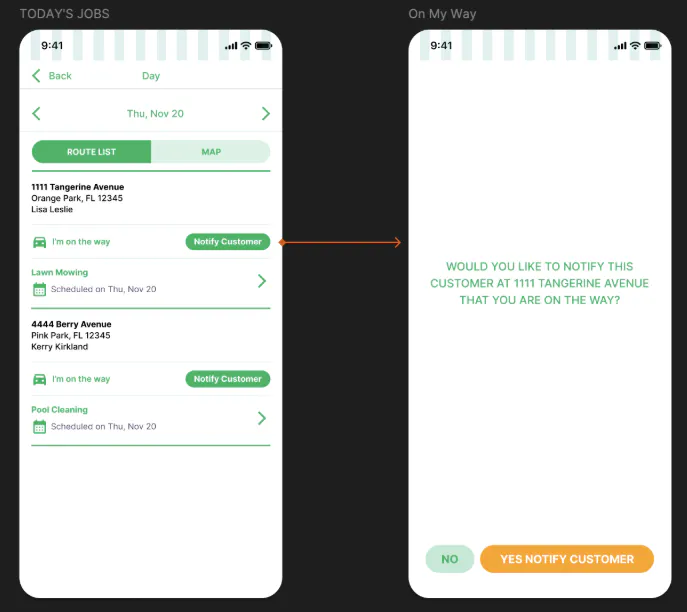
Open the app and go to your Today’s Jobs list.
Find the job you’re about to start.
Tap “I’m on the way.”
Select “Notify Customer.”
To confirm, tap “Yes” - This notifies the customer instantly.
That’s it. No extra steps, no extra effort!
Sending an “On The Way” notification every time helps you:
Show accountability: Customers appreciate knowing when their job is actively in progress.
Build trust: Clear communication goes a long way in creating a dependable experience.
Reduce cancellations: Customers stay informed and are less likely to second-guess scheduled work.
Increase satisfaction & tips: Pros who send this consistently earn stronger reviews and higher payouts.
Small action, big impact!
It takes a couple of seconds, supports your professional image, and helps you deliver the level of service that keeps customers happy. 💚
